
TimelyCare Health & Well-being
Timely Telehealth, LLCMedical
4.456.00 Reviews
- Version
- 3.0.8
- Installs
- 50.00K
- Age Rating
- Everyone
Screenshots
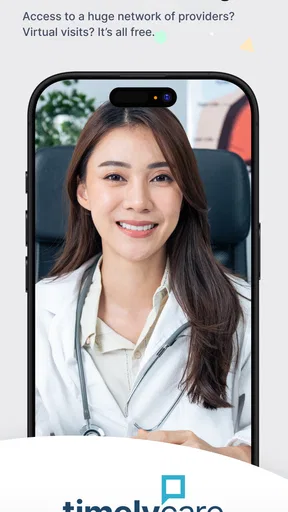
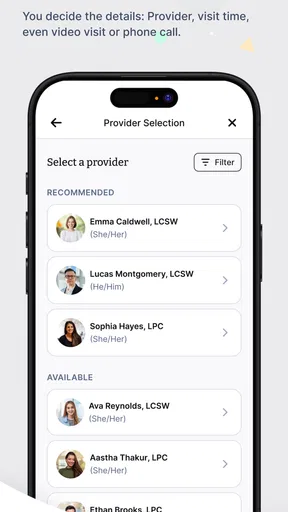
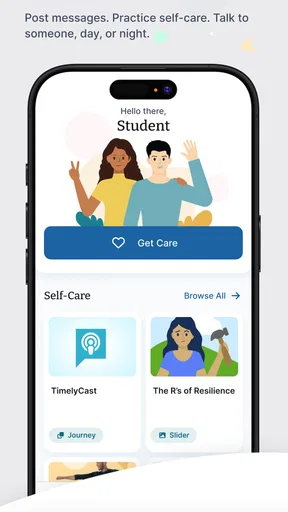
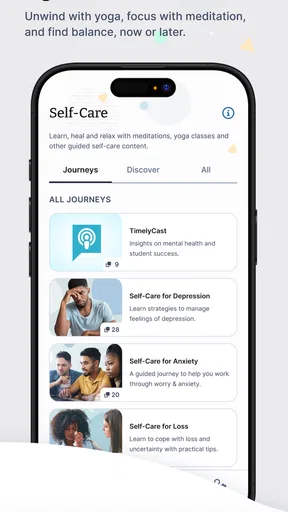
Our Review of TimelyCare Health & Well-being
 Analysis by Appyee
TimelyCare Health & Well-being is a medical app from Timely Telehealth, LLC that I would describe as a digital front door to care rather than a complete replacement for every healthcare visit. Its main appeal is straightforward: it is designed to make care available at any hour, which can be useful when a question appears outside a clinic’s normal schedule or when arranging an in-person appointment is inconvenient. I found the idea most valuable for everyday concerns that need timely guidance, not for emergencies or situations that clearly require hands-on examination.
The app is free and carries an Everyone age rating, so it is easy to consider for a broad range of users. It has reached more than fifty thousand installs and holds a 4.4 average from roughly four hundred ratings, with dozens of written reviews. Those figures suggest that the service has found a real audience, while also reminding me that an app’s usefulness depends heavily on the person’s access, device, connection, and expectations. The current version is 3.0.8, and it runs on Android 7.0 or later.
Getting past the first points of friction
The first challenge with a telehealth app is often not the consultation itself. It is knowing what to do before pressing the button that starts care. I recommend opening TimelyCare when you are calm, rather than waiting until you are worried and trying to complete every setup step in a hurry. Check that the app is installed from the official app marketplace, update it if an update is offered, and make sure your phone has a stable internet connection.
Another sensible check is the device itself. Close applications you are not using, confirm that the phone is not in a restrictive battery-saving mode, and restart the app if it opens to a blank or incomplete screen. These are ordinary steps, but they matter more in a care app because a delayed screen can feel like a medical problem when it may simply be a connection or loading issue.
I also suggest keeping basic information close at hand before starting. Have a clear description of what you need help with, when the issue began, and any relevant medication or health details that you normally share with a clinician. This does not guarantee a faster consultation, but it makes the conversation more useful. A short note in advance can prevent the common problem of remembering an important detail only after the session has ended.
The most useful preparation is a clear boundary between urgent care and routine guidance. TimelyCare may be convenient for a non-emergency concern, a general health question, or a situation where professional direction would help you decide what to do next. It should not be treated as the right channel for a life-threatening emergency, severe breathing trouble, major injury, or any condition where waiting for an online interaction could be dangerous. In those cases, use local emergency services or immediate in-person care.
What to check before blaming the app
If the app does not behave as expected, I would work through the problem in a fixed order instead of repeatedly tapping the same control. First, check whether other apps can reach the internet. If they cannot, the issue is probably the network rather than TimelyCare. Switching between Wi-Fi and mobile data, when available, can help identify whether the problem is limited to one connection.
Next, fully close the app and reopen it. If the screen still looks wrong, restart the phone. This simple sequence clears temporary problems without changing your account or health information. I would avoid deleting the app as a first response, because reinstalling can create extra setup work and may not solve a service-side or network-side interruption.
It is also worth checking the phone’s date and time settings. An incorrect clock can interfere with secure connections and scheduled activity in many mobile services. Keeping the operating system within the supported range is equally important; an older phone may technically install the app but still deliver a less reliable experience if the system is no longer handling modern app components well.
For a video-based interaction, the practical environment matters as much as the software. Move to a place with steady reception, use headphones if background noise is a problem, and position the phone so you do not need to hold it constantly. If the camera or microphone seems unavailable, check the phone’s app permissions and make sure another application is not already using those components. These checks are general device troubleshooting, but they are particularly useful when a consultation depends on being heard and seen clearly.
Recovering a stalled or interrupted workflow
Telehealth sessions do not always fail in a dramatic way. Sometimes the app loads slowly, a screen stops responding, or a connection drops after the process has already begun. When that happens, I would first note where the interruption occurred. Was the problem before entering care, while waiting, or during communication? That detail helps separate a setup issue from a temporary connection problem and gives support staff something concrete to investigate if you need assistance.
If the consultation has not started, reopening the app may be enough. If communication is interrupted, wait briefly before repeatedly restarting, because the service may be trying to restore the connection. When you return, explain that the interaction was interrupted and summarize the last point discussed. Repeating the essential context is safer than assuming the other side received every detail.
A useful habit is to keep a short personal record of the issue, including the approximate time, the screen you saw, and whether other internet services worked. I am not suggesting that users turn a health visit into a technical investigation. The note simply prevents vague troubleshooting and can save time if the same problem happens again. Screenshots may also help with a visible error, provided they do not expose private health information you would rather not share.
If the app repeatedly returns to the same screen, behaves differently after an update, or cannot complete the care flow despite a reliable connection, contact the appropriate support route associated with the service rather than endlessly reinstalling it. A repeated failure across different networks and after a phone restart points more strongly to an account, service, or app issue than to a single device glitch.
When the problem is outside the application
It is easy to judge a telehealth app harshly when the real limitation is the surrounding healthcare system. A clinician may still need information that only an in-person examination, testing, imaging, or local pharmacy can provide. TimelyCare can help with access and direction, but it cannot remove those clinical boundaries. If the professional recommends in-person care, that is not necessarily a failure of the app; it may be the correct outcome of a remote assessment.
Location and eligibility can also shape the experience. A digital care service may be useful only within the arrangements that make it available to a particular user. Before depending on it for an important need, I would confirm that I can actually enter the service and understand how to reach care from my own situation. This is especially important for someone who assumes that a free download automatically means every form of consultation will be available to everyone.
The same distinction applies to device quality. A weak microphone, damaged camera, unstable connection, or nearly full phone can make an otherwise functional service frustrating. If ordinary calls and other video services also fail on the device, replacing or repairing the phone may be more effective than changing telehealth apps. On the other hand, if TimelyCare alone has trouble while everything else works normally, app-specific support becomes the more sensible next step.
How I would use it in an ordinary week
Imagine noticing a health concern late in the evening and feeling unsure whether it can wait until the next day. I would open the app, describe the concern in plain language, and use the available care pathway to seek professional guidance. Before starting, I would write down the symptoms, their timing, and any change since they began. During the interaction, I would ask what warning signs should prompt immediate in-person care and what follow-up would be appropriate.
That last question is easy to overlook. The value of remote care is not only receiving an answer in the moment; it is leaving with a clearer plan. I would make sure I understood whether I should monitor the issue, arrange a regular appointment, seek urgent care, or take another specific next step. If the advice involves watching for changes, writing those changes down can make a later conversation more precise.
For a recurring concern, I would avoid starting from scratch every time. Keeping a private timeline of when symptoms appeared, what made them better or worse, and what guidance I previously received can make future consultations more efficient. This is not a special feature claim about the app; it is a practical workflow that helps compensate for the limited context of a short digital encounter.
I would also avoid using the service as a substitute for a personal medical record. Important instructions, referrals, and medication advice should be recorded in a secure place that I can access later. If a remote consultation leads to care elsewhere, having the details ready can reduce confusion when speaking with a local clinician.
Who will appreciate it, and who should choose another route
I think TimelyCare is best suited to people who value access outside ordinary office routines and are comfortable explaining a concern through a phone. It can be a practical option for someone who wants professional direction before deciding whether an in-person visit is necessary. It may also suit users who already prefer digital services and want a dedicated route to care instead of searching the wider internet for answers.
I would be more cautious recommending it to someone who needs a physical examination, diagnostic testing, immediate treatment, or continuity with a clinician who knows their complete history. In those situations, a primary-care appointment, urgent-care center, specialist, or emergency service may be the better choice. People who have unreliable internet, an older unsupported device, or difficulty communicating through a screen may also find a phone call or in-person visit less frustrating.
Compared with general symptom-search tools, the important difference is the possibility of reaching care rather than receiving a page of automated suggestions. Compared with a traditional clinic, the advantage is convenience and potentially quicker access, while the trade-off is that remote interaction cannot reproduce every part of an examination. Compared with a standard video-call application, a medical service gives the conversation a healthcare purpose, but it still depends on the same basic realities of connection quality, camera, microphone, and device stability.
I would not choose it simply because it is free. Free access is helpful, but the right question is whether the service fits the kind of help I need. A free digital consultation that ends with a necessary in-person visit can still be worthwhile if it provides sensible direction, but it should not be judged as a universal replacement for local healthcare.
My practical verdict after weighing convenience against limits
TimelyCare Health & Well-being is a useful access tool when the main problem is reaching appropriate guidance at a convenient time. I like its clear purpose, its broad age rating, and the fact that the app is free to install. The developer, Timely Telehealth, LLC, has positioned it around convenient access rather than turning it into a general wellness dashboard, and that focused role makes the decision to try it fairly simple for the right user.
My recommendation comes with a preparation rule: install it before you urgently need it, check that your phone and connection handle it comfortably, and know which symptoms require immediate local help instead. If a session stalls, use a calm troubleshooting sequence, record the point of failure, and distinguish technical trouble from a clinician’s decision that in-person care is necessary.
With more than fifty thousand installs and a solid 4.4 average, it has enough user adoption to be worth considering, but those figures should not replace personal judgment. I would keep it available as one route to medical guidance, not as my only route. For routine questions and situations where timely remote direction is appropriate, it can be genuinely convenient. For emergencies, examination-heavy concerns, or users who need a continuous relationship with one local clinician, a different healthcare option remains the better fit.
Verdict
Strengths of TimelyCare Health & Well-being
- Free virtual medical and mental health visits for eligible students.
- Offers 24/7 on-demand support for urgent, non-emergency concerns.
- Includes scheduled counseling and emotional support appointments.
- Can help users avoid travel and long waits at campus clinics.
- Provides health resources and wellness tools in one app.
Limitations of TimelyCare Health & Well-being
- Access depends on participation by your college or university.
- Some services may require student eligibility verification.
- Not suitable for emergencies or serious medical conditions.
- Appointment availability can vary by provider and time of day.
- Certain treatments, prescriptions, or referrals may be limited.
Similar Picks in This Category
View All
WebMD: Symptom Checker
WebMD, LLC4.1

Microphone Amplifier
DOSA Apps4.2

Anatomy Learning - 3D Anatomy
3D Medical OU4.5

Period Tracker and Calendar
SimpleInnovation4.9

GoodRx: Prescription Coupons
GoodRx4.8

CVS Health
CVS Pharmacy4.5
Frequently Asked Questions
What is TimelyCare Health & Well-being?
TimelyCare Health & Well-being is a virtual health platform designed primarily for students at participating colleges and universities. After signing in through an eligible institution, users may be able to access services such as on-demand or scheduled virtual medical visits, mental health support, emotional wellness resources, and health coaching. Available features can vary depending on the school’s plan, location, and eligibility requirements.
Who can use the TimelyCare app, and is it free?
Access is generally provided to students whose colleges or universities partner with TimelyCare. In many cases, eligible students can use covered services without paying at the time of the visit, although exact benefits depend on the institution’s agreement. The app may request school credentials, a student email address, or another verification method. Confirm your eligibility and any limits with your school before relying on the service.
What types of care and wellness services are available?
Depending on your institution’s subscription, TimelyCare may offer virtual medical care for common, non-emergency concerns, scheduled counseling, on-demand emotional support, psychiatry referrals or appointments, self-care content, and wellness coaching. Service availability, appointment hours, provider types, and prescription policies can differ by state and campus. Review the services shown in your account because not every feature is available to every user.
Can TimelyCare replace a doctor, therapist, or emergency service?
No. TimelyCare is intended to supplement campus health resources and provide convenient virtual support, not replace comprehensive in-person medical or mental health care. It is not appropriate for life-threatening symptoms, severe injuries, or urgent emergencies. Call local emergency services or go to the nearest emergency department when necessary. For ongoing or complex conditions, follow up with a qualified in-person healthcare professional.
What should I know about privacy and using the app?
TimelyCare handles health-related information through its platform, so users should review the current privacy policy, consent notices, and terms before scheduling a visit. Use a private internet connection when possible, keep your login details secure, and provide accurate medical information to the clinician. The app may require permissions for notifications, camera, microphone, or location-related functions to support virtual appointments and account features.
